
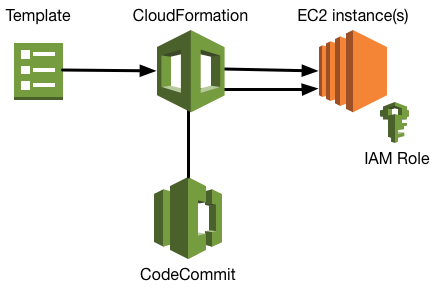
While spinning up EC2 instances you can bootstrap them with packages, files, etc in different ways. For our stack we wanted to pull scripts from an AWS CodeCommit to make life easier.

The (bash) scripts are stored in our CodeCommit so first we need to make sure the EC2 instances, while spinning up, are allowed to access the repository. So we created an IAM Policy with these sufficient rights and attach the policy to a IAM role which we can use to attach to our EC2 instances.
AWS IAM Policy:
{
    "Version": "2012-10-17",
    "Statement": [
        {
            "Effect": "Allow",
            "Action": [
                "codecommit:GitPull"
            ],
            "Resource": "arn:aws:codecommit:*:*:terra10-scripts"
        },
        {
            "Effect": "Allow",
            "Action": [
                "codecommit:Get*",
                "codecommit:BatchGetRepositories",
                "codecommit:List*"
            ],
            "Resource": "*"
        }
    ]
}
We make sure the EC2 instances uses the new IAM Role by defining IamInstanceProfile with our example IAM Role t10-ec2-role in the CloudFormation template. Further on by using the UserData segment we can execute scripts during bootstrap of the server. Install the AWSCLI is required for the credential helper
T10Controller1:
  Type: AWS::EC2::Instance
  Properties:
    ImageId: !Ref HostAMI
    InstanceType: t2.micro
    IamInstanceProfile: t10-ec2-role
    PrivateIpAddress: 10.0.11.11
    Tags:
      - Key: Name
        Value: t10-k8s-controller1
    UserData:
      Fn::Base64: !Sub |
        #!bin/bash -xe
        apt-get update
        apt-get -y install awscli
        cd /tmp
        echo "######## git pull AWS CodeCommit files"
        sudo git config --global credential.helper '!aws codecommit credential-helper $@'
        sudo git config --global credential.UseHttpPath true
        sudo git clone https://git-codecommit.xxxxxx.amazonaws.com/v1/repos/terra10-scripts /tmp/terra10-scripts